Vaizy API
Use the Vaizy API to connect your own scripts, Zapier, Make or other tools to your workspace: create projects from won deals, push milestones and deliverables from your planning tool, log hours from a time tracker, or pull project data into your reporting.
The API is available on the Pro and Enterprise plans.
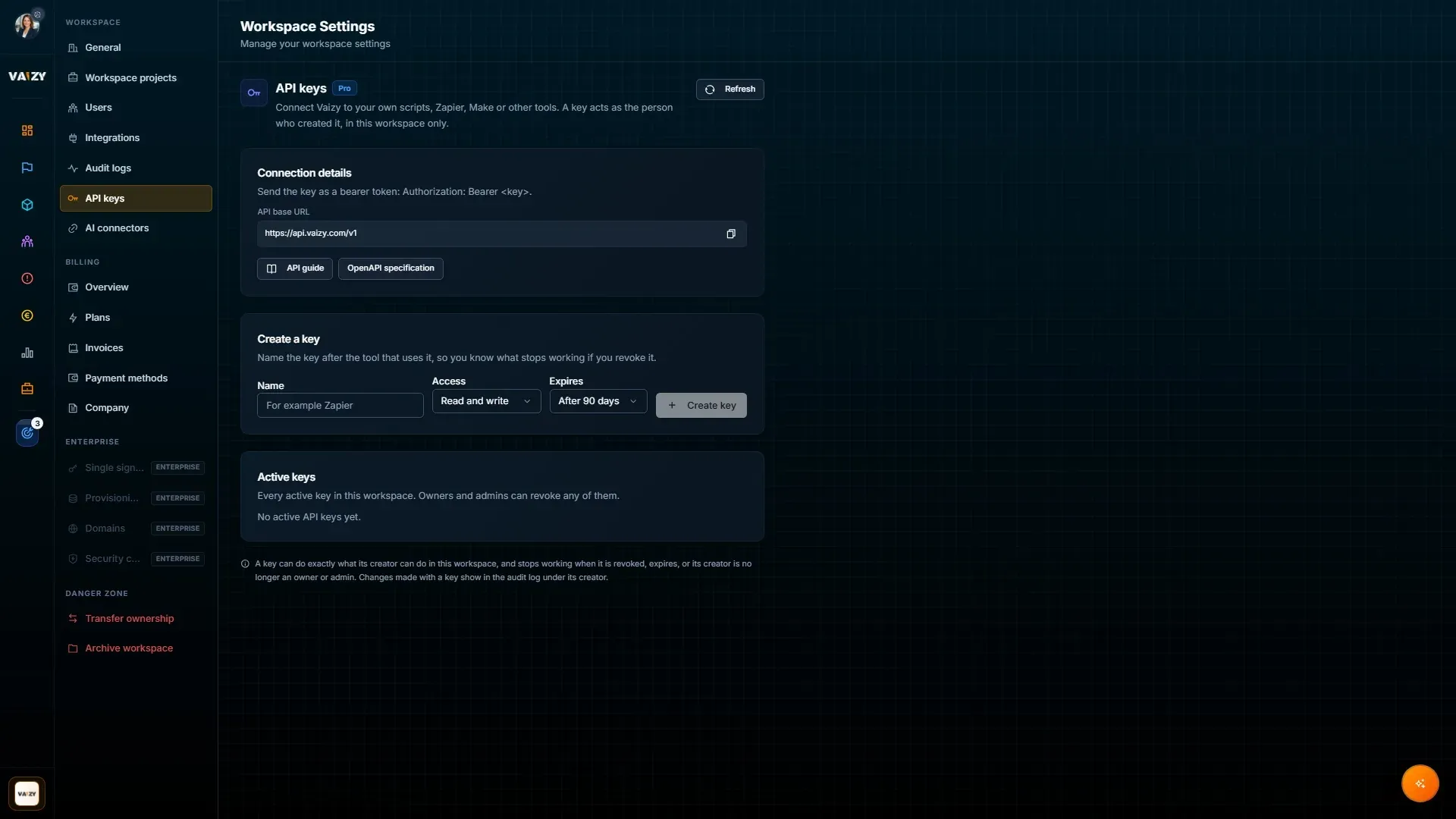
Create an API key
Workspace owners and admins create keys in Settings → API keys.
Give the key a name, ideally the tool that will use it (for example "Zapier"), so you know what stops working if you revoke it.
Choose the access. Read and write can read and change data, Read only can only read.
Choose when the key expires: after 30, 90 or 365 days, or never.
Select Create key and copy it. The key is shown only once. Store it in your tool's secret settings, never in shared documents or code.
Each person can have up to 10 active keys. Owners and admins see every active key in the workspace, with who created it and when it was last used, and can revoke any of them.
What a key can do
A key acts as the person who created it, in that one workspace. It can do exactly what that person can do in Vaizy, nothing more. It stops working as soon as:
it is revoked or expires,
its creator is no longer an owner or admin of the workspace,
the workspace is archived or leaves the Pro and Enterprise plans.
Changes made with a key appear in the audit log under the key's creator, together with the key that made them.
Keys keep working in workspaces that require two-factor authentication or single sign-on, but only for their own workspace. They can only be created from a session that meets those requirements.
Authenticate
Send the key as a bearer token with every request:
Authorization: Bearer vzk_live_...Base URL:
https://api.vaizy.com/v1Test your key:
curl https://api.vaizy.com/v1/me \ -H "Authorization: Bearer vzk_live_..."The response shows the key's name, access and expiry date, and the workspace it belongs to.
The API reference in this help centre lists every endpoint and every field of every resource. It is built from the OpenAPI 3.1 document at https://api.vaizy.com/v1/openapi.json, which you can also import into Postman, Insomnia or any other OpenAPI tool.
Resources
Each resource supports:
GET /{resource}to listPOST /{resource}to createGET /{resource}/{id}to read one recordPATCH /{resource}/{id}to update only the fields you sendDELETE /{resource}/{id}to delete, where allowed
A project's records are also listed under it: GET /projects/{id}/milestones, and the same for deliverables, risks, finances, time_entries and status_remarks.
Create a milestone
curl https://api.vaizy.com/v1/milestones \ -H "Authorization: Bearer vzk_live_..." \ -H "Content-Type: application/json" \ -H "Idempotency-Key: crm-deal-4711-kickoff" \ -d '{ "project_id": "6f1c...", "title": "Kick-off", "start_date": "2026-11-02", "due_date": "2026-11-13" }'Vaizy assigns the milestone code (MS-1, MS-2 and so on), just as when you add a milestone in the app. Deliverables and risks get their codes the same way.
The API reference has every resource's fields, their allowed values, and what you can filter and sort on.
Formats
Dates are
yyyy-MM-dd. Amounts are plain numbers. Currencies are ISO codes such asEUR, and countries are ISO codes such asNL.Unknown fields are rejected instead of ignored, so a typo never silently drops data.
How records behave
Team members created through the API are roster entries. Inviting someone to sign in to Vaizy stays an in-app action.
Team costs are recalculated automatically after you change a milestone's team or dates, or a team member's rate or contract dates. This happens in the background, usually within a minute.
Generated financial records (team costs, contractor invoices and imported actuals) are read-only, because Vaizy keeps them up to date itself.
Timesheets (
time_entries) are one record per project, team member and week.week_start_dateis a Monday, andhourslists the hours per day, for example{ "monday": 8, "tuesday": 6 }. To add hours for a single day, usePOST /ingest/hoursinstead.Status remarks record their author and the project's status at the time they are written. Only the author can change or delete a remark.
The audit log shows what changed, when and by whom. It does not include the changed values themselves.
Your own references: milestones and deliverables have an
external_reffield for the ID in your system (for examplejira:WEB-12). Use it to find records you created earlier:GET /deliverables?external_ref=jira:WEB-12.
Bulk import with ingest
POST /ingest/{type} creates one record; POST /ingest/{type}/batch creates up to 100. Types are projects, milestones, deliverables, team, risks, finances and hours. The fields are the same as for POST /{resource} (team creates team members). hours adds time for one team member on one day to their weekly timesheet, which Vaizy creates if it doesn't exist yet.
Send a batch as rows. Rows are created in order, and each row succeeds or fails on its own:
curl https://api.vaizy.com/v1/ingest/milestones/batch \ -H "Authorization: Bearer vzk_live_..." \ -H "Content-Type: application/json" \ -H "Idempotency-Key: nightly-sync-2026-11-02" \ -d '{ "rows": [ { "project_id": "6f1c2a9e-...", "title": "Design" }, { "project_id": "6f1c2a9e-...", "title": "Build" } ] }'The response is 200 OK and lists every row, even if some failed:
{ "data": [ { "index": 0, "status": "created", "id": "...", "data": { ... } }, { "index": 1, "status": "failed", "error": { "code": "validation_failed", "detail": "..." } } ], "summary": { "total": 2, "succeeded": 1, "failed": 1 }}A row's status is created, updated (for hours added to an existing timesheet) or failed. Fix the failed rows and send only those again.
Filtering, sorting and pages
GET /milestones?project_id=...&due_date[gte]=2026-01-01&sort=-due_date&limit=100Filter with
field=valueorfield[operator]=value. Operators areeq,neq,gt,gte,lt,lte,like,ilike,in(comma separated) andis(nullornot_null). Range operators work on dates.Sort with
sort=field. Put-in front for descending, and separate several fields with commas.Lists return
{ "data": [...], "next_cursor": "..." }. Passcursor=<next_cursor>to get the next page.limitis 1 to 200 (default 50).
The API reference lists which fields each resource can be filtered and sorted on.
Retries and idempotency
Send an Idempotency-Key header with every create, using a value that is unique for that action (for example your own record ID). If a request times out and you retry it with the same key, Vaizy returns the first response instead of creating a second record, with the header Idempotent-Replayed: true. Keys are remembered for 24 hours.
Errors
Errors use the standard problem format:
{ "type": "https://api.vaizy.com/problems/validation_failed", "title": "Unprocessable Content", "status": 422, "code": "validation_failed", "detail": "due_date: must be a date in yyyy-MM-dd format", "errors": [ { "field": "due_date", "code": "invalid_date", "message": "must be a date in yyyy-MM-dd format" } ]}When you contact support about an error, include the correlation_id from the response.
Limits
120 requests per minute per key.
Request bodies up to 1 MB; batches up to 100 rows.
Revoke a key
In Settings → API keys, select the trash icon next to the key. Anything using it stops working right away.
Was this helpful?
Still need help? Ask the team